In our previous Python tutorial, we have implemented Palindrome Check Program in Python. In this tutorial, we will develop a Snake Game using Python.
If you remember that classic snake game and enjoy playing, then I am sure you will find this tutorial interesting.
With Python, there are number of ways to develop game. we can use PyGame library or can use the Turtle library from Python to develop Game. So here in this tutorial we will use Turtle library to develop a snake game. In addition to this module, we will also use Random module.
So let’s start coding:
Import Required Modules
We will create a file snake-game.py and import the required modules.
Here we will import Turtle and Random modules. We will also initialize variables for our game.
import turtle
import random

WINDOW_WIDTH = 600
WINDOW_HEIGHT = 600
FOOD_SIZE = 20
DELAY = 100
Create Game Screen
Now we will use Turtle module and create a Game’s window screen. We will scren width and height, set title and background.
screen = turtle.Screen()
screen.setup(WINDOW_WIDTH, WINDOW_HEIGHT)
screen.title("Snake Game")
screen.bgcolor("blue")
screen.setup(500, 500)
screen.tracer(0)
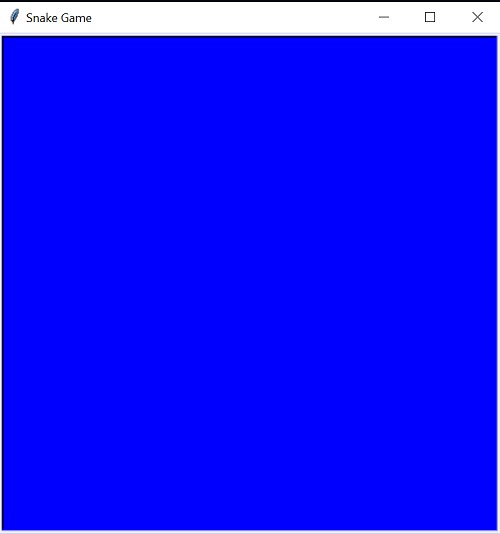
Create Pen and Snake Food
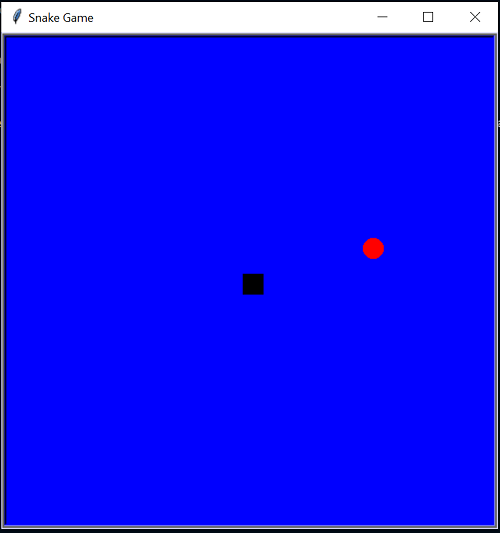
We will design square pen to draw snake using Turtle.
pen = turtle.Turtle("square")
pen.penup()
We will also design food for our snake.
food = turtle.Turtle()
food.shape("circle")
food.color("red")
food.shapesize(FOOD_SIZE / 20)
food.penup()
Set Direction Keys for Snake
Now we will set the keys to handle the snake movement on the screen. We will up key for moving up, down key for moving down, left key for moving left and right key for moving in right direction.
Here, we will set up specific keys that will guide the direction the snake will be moving on the screen. We will use the ‘L’ for left, ‘R’ for right, ‘U’ for up, ‘D’ for down. We will implement these directions using the turtle’s direction function that we will call on the snake.
directions = {
    "up": (0, 20),
    "down": (0, -20),
    "left": (-20, 0),
    "right": (20, 0)
}

def goUp():
    global snakeDirection
    if snakeDirection != "down":
        snakeDirection = "up"

def goRight():
    global snakeDirection
    if snakeDirection != "left":
        snakeDirection = "right"

def goDown():
    global snakeDirection
    if snakeDirection != "up":
        snakeDirection = "down"

def goLeft():
    global snakeDirection
    if snakeDirection != "right":
        snakeDirection = "left"

screen.listen()
screen.onkey(goUp, "Up")
screen.onkey(goRight, "Right")
screen.onkey(goDown, "Down")
screen.onkey(goLeft, "Left")
We will create a function and handle snake food collision.
def foodCollision():
    global foodPosition
    if getDistance(snake[-1], foodPosition) < 20:
        foodPosition = getRandomFoodPosition()
        food.goto(foodPosition)
        return True
    return False
We will implement to get distance of food.
def getDistance(pos1, pos2):
    x1, y1 = pos1
    x2, y2 = pos2
    distance = ((y2 - y1) ** 2 + (x2 - x1) ** 2) ** 0.5
    return distance
We will also create a function to handle random food position.
def getRandomFoodPosition():
    x = random.randint(- WINDOW_WIDTH / 2 + FOOD_SIZE, WINDOW_WIDTH / 2 - FOOD_SIZE)
    y = random.randint(- WINDOW_HEIGHT / 2 + FOOD_SIZE, WINDOW_HEIGHT / 2 - FOOD_SIZE)
    return (x, y)
Handle Snake Movement
We will define a function moveSnake() and handle snake movement.
def moveSnake():
    global snakeDirection

    snakeHead = snake[-1].copy()
    snakeHead[0] = snake[-1][0] + directions[snakeDirection][0]
    snakeHead[1] = snake[-1][1] + directions[snakeDirection][1]

    if snakeHead in snake[:-1]:  # Or collision with walls?
        initialize()
    else:
        snake.append(snakeHead)

        if not foodCollision():
            snake.pop(0)

        if snake[-1][0] > WINDOW_WIDTH / 2:
            snake[-1][0] -= WINDOW_WIDTH
        elif snake[-1][0] < - WINDOW_WIDTH / 2:
            snake[-1][0] += WINDOW_WIDTH
        elif snake[-1][1] > WINDOW_HEIGHT / 2:
            snake[-1][1] -= WINDOW_HEIGHT
        elif snake[-1][1] < -WINDOW_HEIGHT / 2:
            snake[-1][1] += WINDOW_HEIGHT

        pen.clearstamps()

        for segment in snake:
            pen.goto(segment[0], segment[1])
            pen.stamp()

        screen.update()

        turtle.ontimer(moveSnake, DELAY)
Finally, we will function initialize() and call moveSnake() function to handle snake movement.
def initialize():
    global snake, snakeDirection, foodPosition, pen
    snake = [[0, 0], [0, 20], [0, 40], [0, 50], [0, 60]]
    snakeDirection = "up"
    foodPosition = getRandomFoodPosition()
    food.goto(foodPosition)
    moveSnake()
Complete Code for Our Snake Game
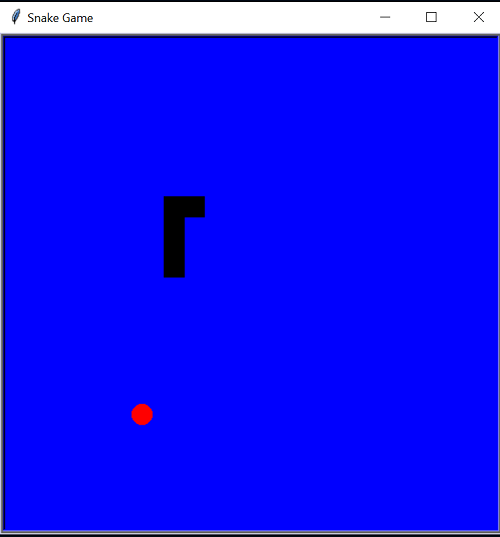
Here is complete code for our snake game.
#snake_game.py

import turtle
import random

WINDOW_WIDTH = 600
WINDOW_HEIGHT = 600
FOOD_SIZE = 20
DELAY = 100

# Screen
screen = turtle.Screen()
screen.setup(WINDOW_WIDTH, WINDOW_HEIGHT)
screen.title("Snake Game")
screen.bgcolor("blue")
screen.setup(500, 500)
screen.tracer(0)

# Pen
pen = turtle.Turtle("square")
pen.penup()

# Food
food = turtle.Turtle()
food.shape("circle")
food.color("red")
food.shapesize(FOOD_SIZE / 20)
food.penup()

directions = {
    "up": (0, 20),
    "down": (0, -20),
    "left": (-20, 0),
    "right": (20, 0)
}

def initialize():
    global snake, snakeDirection, foodPosition, pen
    snake = [[0, 0], [0, 20], [0, 40], [0, 50], [0, 60]]
    snakeDirection = "up"
    foodPosition = getRandomFoodPosition()
    food.goto(foodPosition)
    moveSnake()

def moveSnake():
    global snakeDirection

    #  Next position for snake head
    snakeHead = snake[-1].copy()
    snakeHead[0] = snake[-1][0] + directions[snakeDirection][0]
    snakeHead[1] = snake[-1][1] + directions[snakeDirection][1]

    # Checking self-collision
    if snakeHead in snake[:-1]:  # Or collision with walls?
        initialize()
    else:
        # if no self-collision so we can continue moving the snake.
        snake.append(snakeHead)

        # Checking food collision
        if not foodCollision():
            snake.pop(0)

        #  Allowing screen wrapping
        if snake[-1][0] > WINDOW_WIDTH / 2:
            snake[-1][0] -= WINDOW_WIDTH
        elif snake[-1][0] < - WINDOW_WIDTH / 2:
            snake[-1][0] += WINDOW_WIDTH
        elif snake[-1][1] > WINDOW_HEIGHT / 2:
            snake[-1][1] -= WINDOW_HEIGHT
        elif snake[-1][1] < -WINDOW_HEIGHT / 2:
            snake[-1][1] += WINDOW_HEIGHT

        # Clear previous snake stamps
        pen.clearstamps()

        # Draw snake
        for segment in snake:
            pen.goto(segment[0], segment[1])
            pen.stamp()

        # Refresh screen
        screen.update()

        # Rinse and repeat
        turtle.ontimer(moveSnake, DELAY)

def foodCollision():
    global foodPosition
    if getDistance(snake[-1], foodPosition) < 20:
        foodPosition = getRandomFoodPosition()
        food.goto(foodPosition)
        return True
    return False

def getRandomFoodPosition():
    x = random.randint(- WINDOW_WIDTH / 2 + FOOD_SIZE, WINDOW_WIDTH / 2 - FOOD_SIZE)
    y = random.randint(- WINDOW_HEIGHT / 2 + FOOD_SIZE, WINDOW_HEIGHT / 2 - FOOD_SIZE)
    return (x, y)

def getDistance(pos1, pos2):
    x1, y1 = pos1
    x2, y2 = pos2
    distance = ((y2 - y1) ** 2 + (x2 - x1) ** 2) ** 0.5
    return distance

def goUp():
    global snakeDirection
    if snakeDirection != "down":
        snakeDirection = "up"

def goRight():
    global snakeDirection
    if snakeDirection != "left":
        snakeDirection = "right"

def goDown():
    global snakeDirection
    if snakeDirection != "up":
        snakeDirection = "down"

def goLeft():
    global snakeDirection
    if snakeDirection != "right":
        snakeDirection = "left"

# Here is  event handlers
screen.listen()
screen.onkey(goUp, "Up")
screen.onkey(goRight, "Right")
screen.onkey(goDown, "Down")
screen.onkey(goLeft, "Left")

initialize()
turtle.done()
This is a fun and easy way to create Game using the turtle library. This is a base level Snake Game with Python for beginners. The Game scoring is not covered in this tutorial. you can try this at your end and enhance to add scoring and other features.