In our previous Python tutorial, we have developed Online Web Chat using Flask and Python. In this tutorial, we will build a Discussion Forum system with Python, Flask & MySQL.
A forum system is a program which allows member to hold discussions online. The discussion is started by a member by posting a topic and other members reply on that topic. This allows members to share information and ideas.
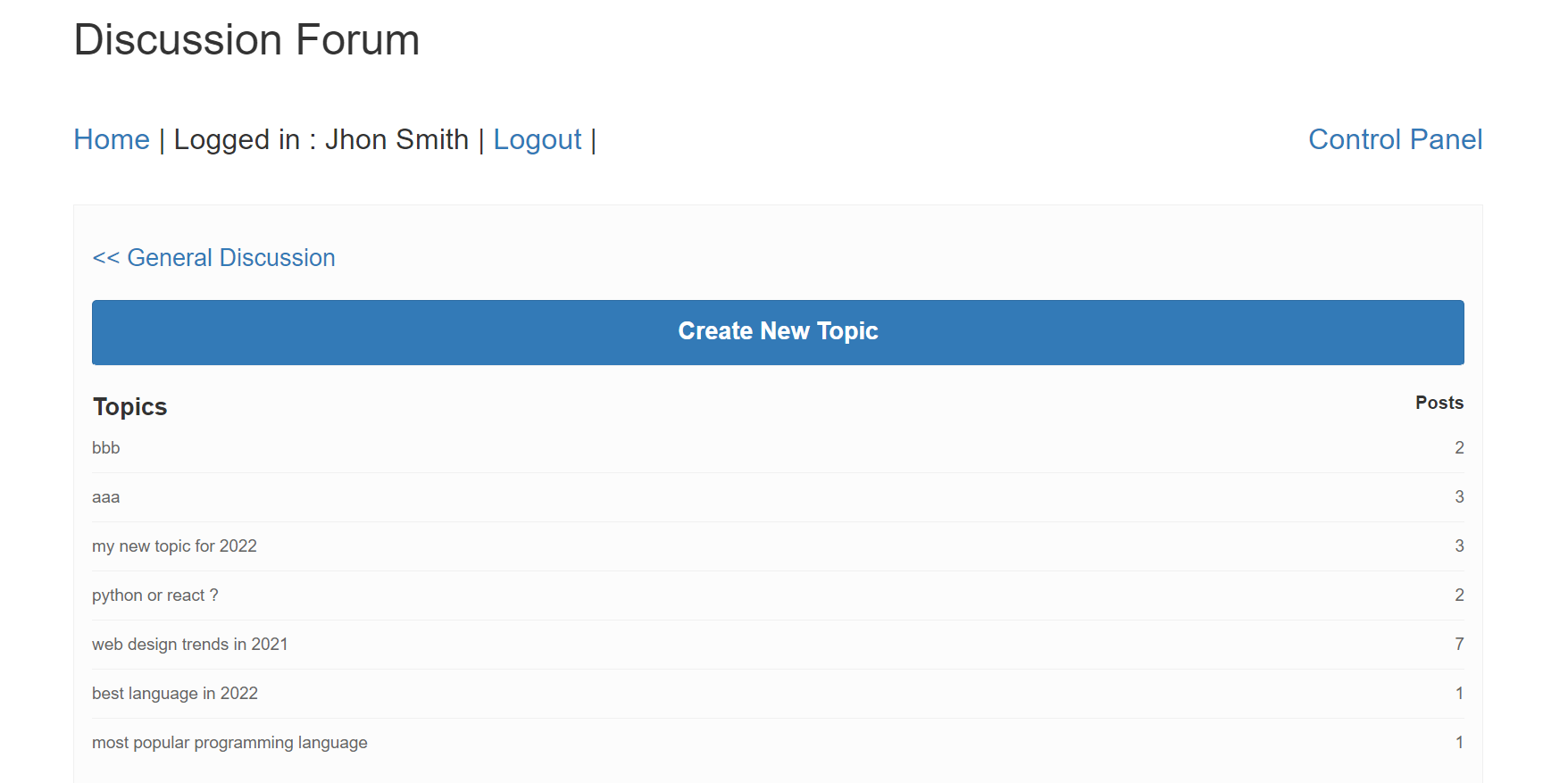
So let’s proceed with developing Discussion Forum System Project:
1. Project Setup and Module Installation
First we will create our discussion forum project discussion-forum-python-flask-mysql using below command.
$ mkdir discussion-forum-python-flask-mysql
and moved to the project.
$ cd discussion-forum-python-flask-mysql
Then we will install required modules for our application. As we will develop a web based application, so we will install Flask micro framework module to create web application.
$ pip install Flask
As we will use MySQL database, so we will also install flask_mysqldb module. This is Python package that can be used to connect to MySQL database. We will install it using the below command:
pip install flask_mysqldb
2. Initialize Application
We will create project file app.py and import required modules. We will create flask instance and also configure MySQL database connection.
from flask import Flask, render_template, request, redirect, url_for, session, jsonify
from flask_mysqldb import MySQL
import MySQLdb.cursors
from datetime import date
import re
import os
import sys
import hashlib

app = Flask(__name__)

app.secret_key = 'abcd21234455'
app.config['MYSQL_HOST'] = 'localhost'
app.config['MYSQL_USER'] = 'root'
app.config['MYSQL_PASSWORD'] = ''
app.config['MYSQL_DB'] = 'forums'

mysql = MySQL(app)
3. Implement User Login
We will implement user login functionality by creating a function login() in app.py. We will display login form if user not yet login otherise implement login and redirect to category listing page.
@app.route('/login', methods =['GET', 'POST'])
def login():
    mesage = ''
    if request.method == 'POST' and 'email' in request.form and 'password' in request.form:
        email = request.form['email']
        #password = hashlib.md5((request.form['password']).encode('utf-8'))
        password = hashlib.md5((request.form['password']).encode('ISO-8859-1 ')).hexdigest()
        cursor = mysql.connection.cursor(MySQLdb.cursors.DictCursor)
        cursor.execute('SELECT * FROM forum_users WHERE email = % s AND password = % s', (email, password, ))
        user = cursor.fetchone()
        if user:
            session['loggedin'] = True
            session['userid'] = user['user_id']
            session['name'] = user['name']
            session['email'] = user['email']
            session['role'] = user['usergroup']
            mesage = 'Logged in successfully !'
            return redirect(url_for('category'))
        else:
            mesage = 'Please enter correct email / password !'
    return render_template('login.html', mesage = mesage)
We will create template file login.html for login page.
{% include 'header.html' %}
<body>
  <div class="container-fluid" id="main">
  {% include 'top_menus.html' %}
    <div class="row row-offcanvas row-offcanvas-left">
      <div class="col-md-9 col-lg-10 main">
		<h2>User Login</h2>
		<form action="{{ url_for('login') }}" method="post">
			{% if mesage is defined and mesage %}
				<div class="alert alert-warning">{{ mesage }}</div>
			{% endif %}
			<div class="form-group">
				<label for="email">Email:</label>
				<input type="email" class="form-control" id="email" name="email" placeholder="Enter email" name="email">
			</div>
			<div class="form-group">
				<label for="pwd">Password:</label>
				<input type="password" class="form-control" id="password" name="password" placeholder="Enter password" name="pswd">
			</div>
			<button type="submit" class="btn btn-primary">Login</button>
		</form>
        <hr>
       </div>
      </div>
    </div>
  </body>
</html>
4. List Category and Topics
We will create function category() to list categories and also topics from categories.
@app.route("/category", methods =['GET', 'POST'])
def category():
    if request.args.get('category_id'):
        cursor = mysql.connection.cursor(MySQLdb.cursors.DictCursor)
        cursor.execute('SELECT c.name, t.category_id, t.subject, t.topic_id, t.user_id, t.created, count(p.post_id) AS total_post FROM forum_topics as t LEFT JOIN forum_posts as p ON t.topic_id = p.topic_id LEFT JOIN forum_category as c ON t.category_id = c.category_id WHERE t.category_id = %s GROUP BY t.topic_id ORDER BY t.topic_id DESC', (request.args.get('category_id'),))

        topics = cursor.fetchall()

        cursor.execute('SELECT category_id, name FROM forum_category WHERE category_id = %s ', (request.args.get('category_id'),))
        category = cursor.fetchone()

        return render_template("category.html", topics = topics, category = category, request=request)

    else:
        cursor = mysql.connection.cursor(MySQLdb.cursors.DictCursor)
        cursor.execute('SELECT category.category_id, category.name, category.description, count(topic.category_id) AS total_topic FROM forum_category category LEFT JOIN forum_topics topic ON category.category_id = topic.category_id  GROUP BY category.category_id ORDER BY category_id DESC')
        categories = cursor.fetchall()
        return render_template("category.html", categories = categories, request=request)
We will create template file category.html to list categories and topics.
{% include 'header.html' %}
<body>
<div class="container">
	<div class="row">
		<h1>Discussion Forum</h1><br>
		{% include 'top_menus.html' %}
		{% if request.args.get('category_id') %}
			<div class="single category">
				<span style="font-size:20px;"><a href="{{ url_for('category') }}"><< {{category.name}}</a></span>
				<br>	<br>
				<ul class="list-unstyled">
					<li class="text-right">
					<a type="button" class="btn btn-primary" href="{{url_for('compose', category_id=category.category_id)}}"><span style="font-size:20px;font-weight:bold;color:white;">Create New Topic</span></a>
					</li><br>
					<li><span style="font-size:20px;font-weight:bold;">Topics</span> <span class="pull-right"><span style="font-size:15px;font-weight:bold;">Posts</span></span></li>
					{% for topic in topics %}
						<li><a href="{{url_for('post', topic_id=topic.topic_id)}}" title="">{{topic.subject}} <span class="pull-right">{{topic.total_post}}</span></a></li>
					{% endfor %}
				</ul>
		   </div>
	   {% else %}
		    <div class="single category">
				<ul class="list-unstyled">
					<li><span style="font-size:25px;font-weight:bold;">Categories</span> <span class="pull-right"><span style="font-size:20px;font-weight:bold;">Topics</span></span></li>
					{% for category in categories %}
						<li><a href="{{url_for('category', category_id=category.category_id)}}">{{category.name}}<span class="pull-right">{{category.total_topic}}</span></a></li>
					{% endfor %}
				</ul>
		   </div>
	   {% endif %}
	</div>
</div>
</body>
</html>
5. Compose Topics
We will create function compose() to create a new topic.
@app.route("/compose", methods =['GET', 'POST'])
def compose():
    if 'loggedin' in session:
        if request.args.get('category_id'):
            cursor = mysql.connection.cursor(MySQLdb.cursors.DictCursor)

            cursor.execute('SELECT category_id, name FROM forum_category WHERE category_id = %s ', (request.args.get('category_id'),))
            category = cursor.fetchone()

            return render_template("compose.html", category = category)
    return redirect(url_for('login'))
we will create template file comose.html to create a new topic.
{% include 'header.html' %}
<body>
<div class="container">
	<div class="row">
		<h1>Discussion Forum</h1><br>
		{% include 'top_menus.html' %}
		<br>
		<span style="font-size:20px;"><a href="{{ url_for('category') }}"><< {{category.name}}</a></span>
		<br><br>
		<div id="createNewtopic">
			<form id="topicForm" name="topicForm" method="post" action="{{ url_for('save_topic')}}">
				<div class="form-group">
					<label for="email">Topic Name:</label>
					<input type="text" name="topicName" id="topicName" class="form-control">
				</div>
				<div class="form-group">
					<label for="email">Message:</label>
					<textarea class="form-control" name="message" id="message" rows="5"></textarea>
				</div>
				<input type="hidden" name="action" value="createTopic">
				<input type="hidden" name="categoryId" value="{{category.category_id}}">
				<button type="submit" id="saveTopic" name="saveTopic" class="btn btn-info">Create Topic</button>
			</form>
		</div>

	</div>
</div>
</body>
</html>
6. List Posts
We will create function post() to list posts.
@app.route("/post", methods =['GET', 'POST'])
def post():
    cursor = mysql.connection.cursor(MySQLdb.cursors.DictCursor)
    if request.args.get('topic_id'):

        cursor.execute('SELECT topic_id, subject, category_id FROM forum_topics WHERE topic_id = %s ', (request.args.get('topic_id'),))
        topic = cursor.fetchone()

        cursor.execute('SELECT p.post_id, p.message, p.topic_id, p.user_id, p.name, p.created, u.name AS username FROM forum_posts p LEFT JOIN forum_users u ON u.user_id = p.user_id WHERE p.topic_id = %s ', (request.args.get('topic_id'),))

        posts = cursor.fetchall()

        return render_template("post.html", topic = topic, posts = posts)
We will create a template file post.html to list posts.
{% include 'header.html' %}
<body>
<div class="container">
	<div class="row">
		<h1>Discussion Forum</h1><br>
		{% include 'top_menus.html' %}

		<br>
		<div id="postLsit">
		   <div class="posts list">
				<span style="font-size:20px;"><a href="{{url_for('category', category_id=topic.category_id)}}"><< {{topic.subject}}</a></span>
				<br><br>

				{% for post in posts %}
				<article class="row" id="postRow_{{post.post_id}}">
					<div class="col-md-2 col-sm-2 hidden-xs">
					  <figure class="thumbnail">
						<img class="img-responsive" src="{{url_for('static', filename='images/user-avatar.png')}}" />
						<figcaption class="text-center">{{post.username}}</figcaption>
					  </figure>
					</div>
					<div class="col-md-10 col-sm-10">
					  <div class="panel panel-default arrow left">
						<div class="panel-body">
						  <header class="text-left">
							<div class="comment-user"><i class="fa fa-user"></i> By: {{post.username}}</div>
							<time class="comment-date" datetime="16-12-2014 01:05"><i class="fa fa-clock-o"></i> {{post.created}}</time>
						  </header>
						  <br>
						  <div class="comment-post"  id="post_message_{{post.post_id}}">
							{{post.message}}
						  </div>

						  <textarea name="message" data-topic-id="{{post.topic_id}}" id="{{post.post_id}}" style="visibility: hidden;"></textarea><br>

						  <div class="text-right">
							<a href="{{url_for('edit_post', post_id=post.post_id)}}" class="btn btn-default btn-sm"><i class="fa fa-reply"></i> Edit</a>
							<a class="btn btn-default btn-sm"><i class="fa fa-reply"></i> Delete</a>
						  </div>


						<div id="editSection_{{post.post_id}}" class="hidden">
							<button type="submit" id="save_{{post.post_id}}" name="save" class="btn btn-info saveButton">Save</button>
							<button type="submit" id="cancel_{{post.post_id}}" name="cancel" class="btn btn-info saveButton">Cancel</button>
						</div>
						</div>

					  </div>
					</div>
				</article>
				{% endfor %}
		   </div>
		</div>

	</div>
</div>
</body>
</html>
7. Implement Post Reply
We will create form with create post in a topic with action save_post to save post.
{% if session['userid'] %}
	<form id="posts" name="posts" method="post" action="{{ url_for('save_post')}}">
		<textarea name="message" id="message" class="form-control" rows="3" placeholder="Write here..."></textarea><br>
		<input type="hidden" name="action" id="action" value="save" />
		<input type="hidden" name="topic_id" value="{{topic.topic_id}}">
		<button type="submit" id="save" name="save" class="btn btn-info saveButton">Post</button>
	</form>
{% else %}
	<a href="{{ url_for('login') }}">Login to reply</a>
{% endif %}
We will create function save_post() to implement to save post.
@app.route("/save_post", methods =['GET', 'POST'])
def save_post():
	if 'loggedin' in session:
		cursor = mysql.connection.cursor(MySQLdb.cursors.DictCursor)
		if request.method == 'POST' and 'topic_id' in request.form and 'message' in request.form:

			topicId = request.form['topic_id']
			message = request.form['message']

			cursor.execute('INSERT INTO forum_posts (`message`, `topic_id`, `user_id`) VALUES (%s, %s, %s)', (message, topicId, session['userid']))
			mysql.connection.commit()

			return redirect(url_for('post', topic_id = topicId))

	return redirect(url_for('login'))